What is replication frequency? Link to heading
It refers to how often a variable is replicated in game, useful in cases where there are many variables that don’t require replication every single tick, one of it’s main uses is to save the limited amount of bandwidth a server has at any given moment. After the set amount of time has passed, the server will check the replicated actor and send information to the relevant clients in case there are any changes.
Implementation Link to heading
When setting up replication frequency it’s important to keep in mind that lowering the amount of times can impact the game’s feel and responsiveness, so try different values to determine what works best for your game.
To set up adaptive network update frequency first head to your DefaultEngine.ini file and under the [SystemSettings] section add this variable and set it to 1 like so:

Reopen your editor and create a new class based on actor, then make a blueprint and use the class you just created as a parent class.
For this example first head to your .h file and add the following:
UPROPERTY(BlueprintReadWrite, EditAnywhere)
	class UStaticMeshComponent* MeshComponent;

	UPROPERTY(EditDefaultsOnly)
	class UTextRenderComponent* MyColorCounterText;

	FTimerHandle ColorChangeTimerHandle;

	void ChangeMaterialColor();

	void ColorChange(FLinearColor myColor);

	void CounterTextUpdate(int Counter);

	UPROPERTY(Replicated)
	FLinearColor CurrentColor;
	UPROPERTY(ReplicatedUsing = OnRep_CounterUpdated)
	int ColorCounter = 0;

	UFUNCTION()
	void OnRep_CounterUpdated();

	// Called every frame
	virtual void Tick(float DeltaTime) override;
	virtual void GetLifetimeReplicatedProps(TArray<FLifetimeProperty>& OutLifetimeProps) const override;
- The UStaticMeshComponent will be used to display a sphere that changes color multiple times a second and the UTextRenderComponent will allow us to see how many times this actor has changed colors.
- The timer is used to call ChangeMaterialColor(), which is in charge of generating a random color, ColorChange() and CounterTextUpdate will update the server and clients’ sphere’s color and counter.
- We will also be using a rep notify for the clients, each time the color counter changes OnRep_CounterUpdated() will be called to update the display color and counter text on the clients.
- Add GetLifetimeReplicatedProps for the color and counter variable replication.
After setting everything up head to your .cpp file and initialize the necessary components on your constructor.
	PrimaryActorTick.bCanEverTick = true;
	bReplicates = true;
	//Update Frequency
	SetNetUpdateFrequency(0.01);
	SetMinNetUpdateFrequency(0.01);

	// Mesh component
	MeshComponent = CreateDefaultSubobject<UStaticMeshComponent>("MeshComponent");
	MeshComponent->SetIsReplicated(true);

	// Color change
	CurrentColor = FLinearColor::White;

	// Counter text
	FString Text = "Color changes:";
	MyColorCounterText = CreateDefaultSubobject<UTextRenderComponent>(*Text);
	MyColorCounterText->SetIsReplicated(true);
	MyColorCounterText->SetText(FText::FromString("Color changes:"));
	MyColorCounterText->SetTextRenderColor(FColor::Red);
	MyColorCounterText->SetXScale(1.0f);
	MyColorCounterText->SetYScale(1.0f);
	MyColorCounterText->SetHorizontalAlignment(EHorizTextAligment::EHTA_Center);
	MyColorCounterText->SetupAttachment(MeshComponent);
- Set the actor to replicate.
- Set the network update frequency to the desired values, this will determine how often the actor will update for clients.
- Initialize the MeshComponent and set it to replicate.
- Initialize the color variable.
- Initialize the counter text and set it to replicate.
void AMTReplicationFrequency::BeginPlay()
{
	Super::BeginPlay();
	if (HasAuthority())
	{
		GetWorldTimerManager().SetTimer(ColorChangeTimerHandle, this, &AMTReplicationFrequency::ChangeMaterialColor, 0.2f, true);
	}
}
On your BeginPlay() function call ChangeMaterialColor() every 0.2f seconds.
void AMTReplicationFrequency::ChangeMaterialColor()
{
	FLinearColor RandomColor = FLinearColor(FMath::FRand(), FMath::FRand(), FMath::FRand(), 1.0f);
	CurrentColor = RandomColor;
	ColorCounter += 1;
	ColorChange(CurrentColor);
}
This function just picks a random color and assigns it to the variable we set before, then, it increases the color counter and calls the function to change the color on the mesh.
void AMTReplicationFrequency::ColorChange(FLinearColor myColor)
{
	if (MeshComponent)
	{
		UMaterialInterface* Material = MeshComponent->GetMaterial(0);

		if (Material)
		{
			UMaterialInstanceDynamic* DynamicMaterial = MeshComponent->CreateAndSetMaterialInstanceDynamic(0);

			if (DynamicMaterial)
			{
				DynamicMaterial->SetVectorParameterValue("Color", myColor);

				CounterTextUpdate(ColorCounter);
			}
		}
	}
}
For the ColorChange(FLinearColor myColor) function validate your mesh component, create a UMaterialInterface and get the material from your MeshComponent. Then, create a UMaterialInstanceDynamic and call CreateAndSetMaterialInstanceDynamic, finally on the DynamicMaterial, call SetVectorParameterValue passing the parameter name and your color variable. After setting everything up, call the CounterTextUpdate(ColorCounter) passing the counter to update the text that will be displayed above the mesh.
void AMTReplicationFrequency::CounterTextUpdate(int Counter)
{
	FString MyText = "Color changes: ";
	MyText.Append(FString::FromInt(Counter));
	FText ResultText = FText::FromString(MyText);
	if (MyColorCounterText)
	{
		MyColorCounterText->SetText(ResultText);
	}
}
CounterTextUpdate will only append the updated value of the counter to a local string variable and update the text on the counter.
After those changes are made, to update the color and text for the clients implement the GetLifetimeReplicatedProps and the variables that we need to replicate.
void AMTReplicationFrequency::GetLifetimeReplicatedProps(TArray<FLifetimeProperty>& OutLifetimeProps) const
{
	Super::GetLifetimeReplicatedProps(OutLifetimeProps);
	DOREPLIFETIME(AMTReplicationFrequency, CurrentColor);
	DOREPLIFETIME(AMTReplicationFrequency, ColorCounter);
}
Create the implementation for OnRep_CounterUpdated() and call the function to change the color of the sphere.
void AMTReplicationFrequency::OnRep_CounterUpdated()
{
	ColorChange(CurrentColor);
}
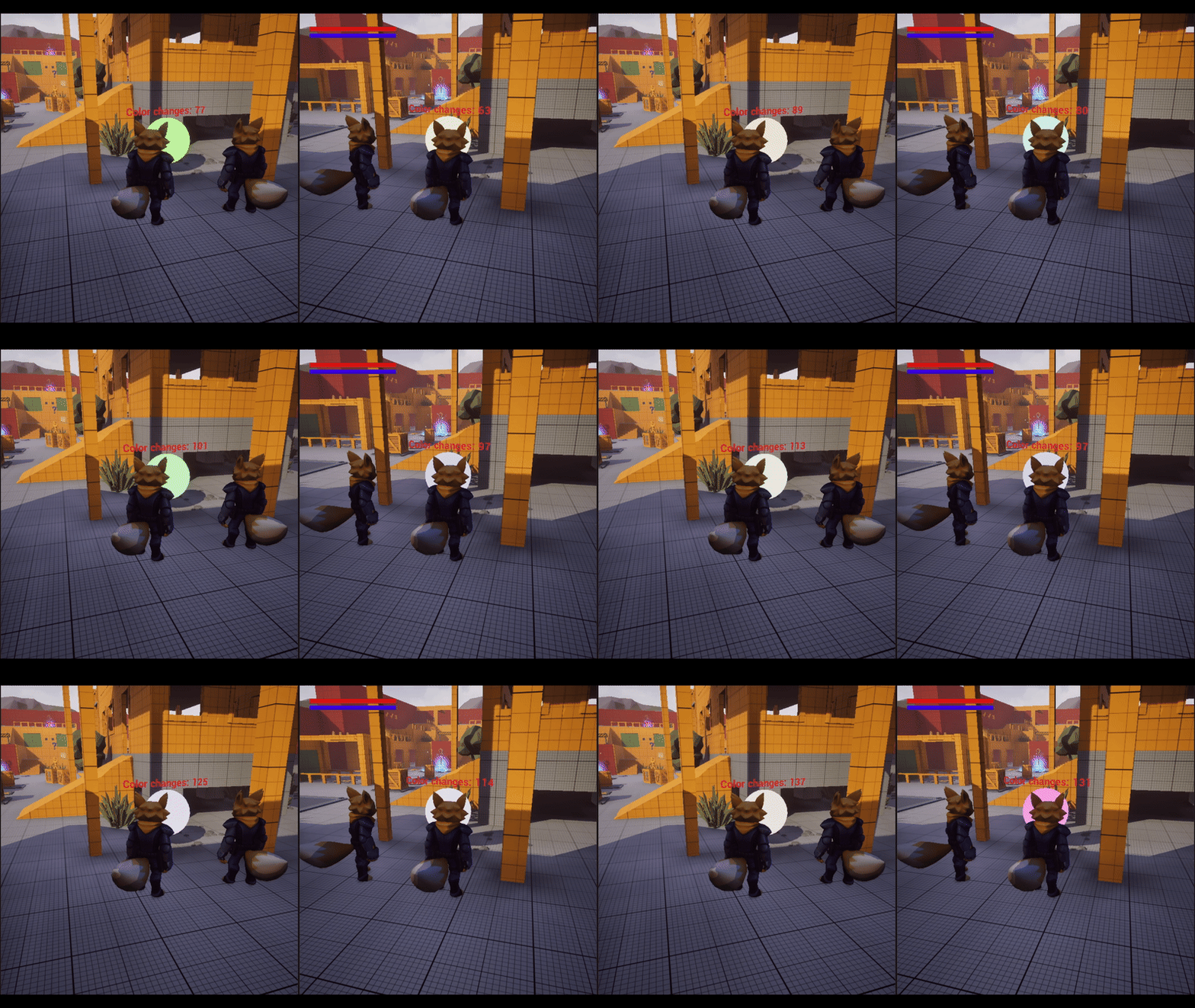
After compiling, you should be able to see your sphere changing color on the client every n amount of seconds because of the adaptive update frequency.
References Link to heading
- Property Replication. | Unreal Engine 5.5 Documentation | Epic Developer Community. (2025). Epic Games Developer. https://dev.epicgames.com/documentation/en-us/unreal-engine/property-replication-in-unreal-engine?application_version=5.2