Unreal Engine allows the creation of custom latent nodes to do async tasks while the code execution continues parallelly.
One way to make latent nodes is to create new classes that inherit from UBlueprintAsyncActionBase and create the function for your node. The function must be BlueprintCallable and add in its metadata information BlueprintInternalUseOnly = “true” and a world context object (the name in metadadata must be the same name of the object in the parameters).
Once the function is created you have to declare a dyanmic multicast delegate for the outpunt pins of your node using DECLARE_DYNAMIC_MULTICAST_DELEGATE(FYourDelegateName); and the variables for every output pin you’ll need.
/// Header file
DECLARE_DYNAMIC_MULTICAST_DELEGATE(FAsyncOutputPin);

UCLASS(BlueprintType, meta = (ExposedAsyncProxy = AsyncAction))
class MT_API UMTAT_Timer : public UBlueprintAsyncActionBase
{
	GENERATED_BODY()

public:
	UFUNCTION(BlueprintCallable, meta = (BlueprintInternalUseOnly = "true", WorldContext = "WorldContext"))
	static UMTAT_Timer* CheckTimeAmount(UObject* WorldContext, int TotalTime);

	UPROPERTY(BlueprintAssignable)
	FAsyncOutputPin OnTimeUpdated;

	UPROPERTY(BlueprintAssignable)
	FAsyncOutputPin OnTimeCompleted;

	UPROPERTY(BlueprintAssignable)
	FAsyncOutputPin OnCancelled;
For the following example we are creating a latent node for a platform trigger that will be completed if a player stays enough time inside, so it’s gonna need a TimerHandle to count the seconds, a world context object and variables for the amount of time needed and the time the player has been inside the trigger. As for the functions we created one to update the time, finish and cancel the timer and overrode a function called Activate which is called once your latent node is called.
	FTimerHandle TimerHandle;

	UPROPERTY(BlueprintReadOnly)
	int CurrentTime;
	int TotalTime;

	UPROPERTY()
	UObject* WorldContext = nullptr;

	virtual void Activate() override;

	void Update();

	void FinishTimer();

	UFUNCTION(BlueprintCallable)
	void CancelTimer();
};
In your cpp file you have to include the headers “Kismet/BlueprintAsyncActionBase.h” and “Delegates/DelegateCombinations.h”, then create the function for your latent node. In this function you just have to create the object, initialize its data and return it.
#include "Kismet/BlueprintAsyncActionBase.h"
#include "Delegates/DelegateCombinations.h"

UMTAT_Timer* UMTAT_Timer::CheckTimeAmount(UObject* WorldContext, int TotalTime)
{
	UMTAT_Timer* BlueprintNode  = NewObject<UMTAT_Timer>();
	BlueprintNode->WorldContext = WorldContext;
	BlueprintNode->TotalTime = TotalTime;


	return BlueprintNode;
}
Once the node is activated the timer will be set and inside the Update function which will update the value until the time is over. Every time Update is called OnTimeUpdated will be broadcasted to allow you to update your logic based on the new values.
In case CurrentTime has reached the “over” condition, OnTimeCompleted is broadcasted to trigger the logic connected to that output pin.
void UMTAT_Timer::Activate()
{
	if(UWorld* World = GEngine->GetWorldFromContextObject(WorldContext, EGetWorldErrorMode::ReturnNull))
	{
		CurrentTime = TotalTime;
		World->GetTimerManager().SetTimer(TimerHandle, this, &ThisClass::Update, 1.f, true);
	}
	else
		CancelTimer();
}

void UMTAT_Timer::Update()
{
	CurrentTime--;
	OnTimeUpdated.Broadcast();
	if(CurrentTime <= 0)
	{
		OnTimeCompleted.Broadcast();
		FinishTimer();
	}
}
FinishTimer invalidates and finishes the timer, after that, SetReadyToDestroy is called to nodify the node that it has to be destroyed. On the other hand, CancelTimer is the function which will trigger the output called OnCancelled in case something is not valid inside the logic or another gameplay element notifies that the timer must be interrupted (when the player leaves the trigger for example).
void UMTAT_Timer::FinishTimer()
{
	if(TimerHandle.IsValid())
	{
		if(UWorld* World = GEngine->GetWorldFromContextObject(WorldContext, EGetWorldErrorMode::ReturnNull))
		{
			World->GetTimerManager().ClearTimer(TimerHandle);
			TimerHandle.Invalidate();
		}
	}

	SetReadyToDestroy();
}

void UMTAT_Timer::CancelTimer()
{
	OnCancelled.Broadcast();

	FinishTimer();
}
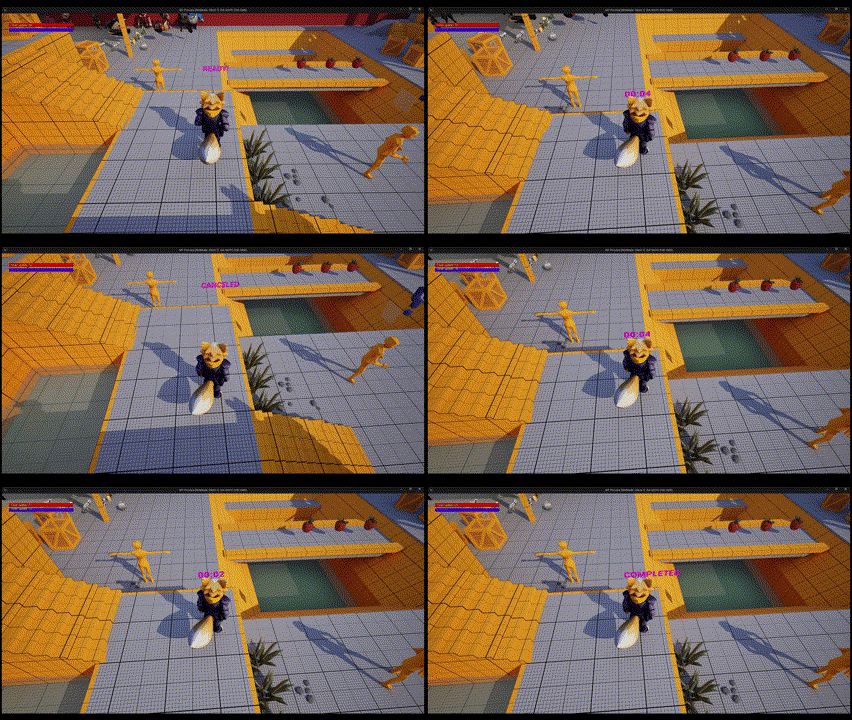
With your function declared you can call your latent node on blueprints and connect the necessary logic on each output pin. In this case the node is called once the player is inside of the trigger and the timer will be updated with the seconds amount everytime OnTimerUpdated is broadcasted.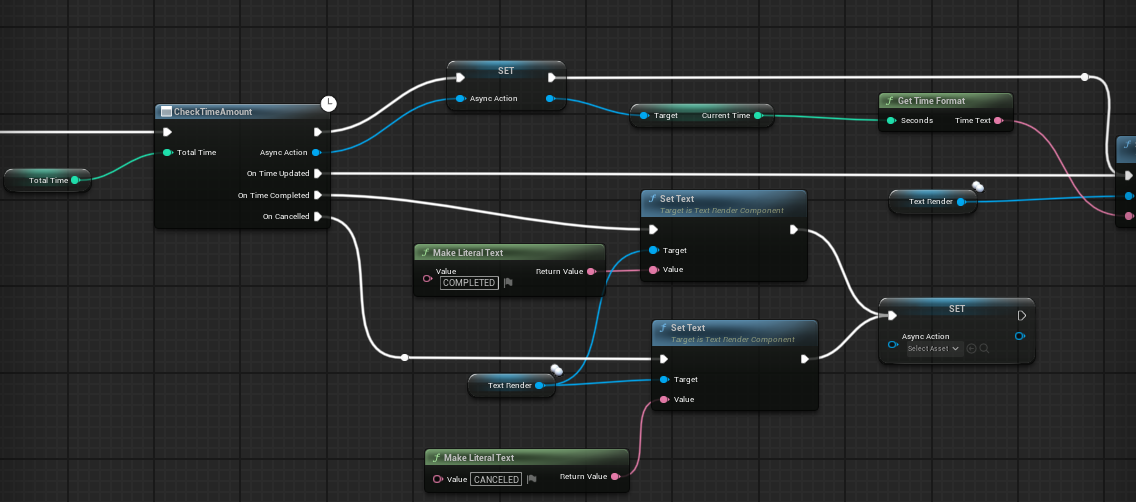 Notice the node has a pin to continue the execution as normal nodes do. Its recommeded to save the Async Action reference in case you need to call a function that belongs to it (CancelTimer for example).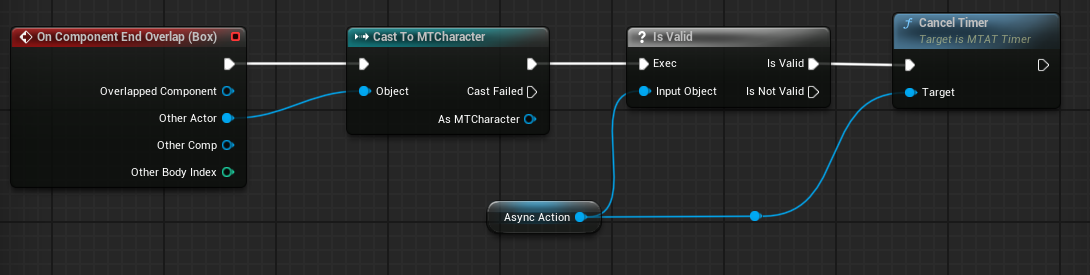
References Link to heading
- Metadata Specifiers in Unreal Engine | Unreal Engine 5.5 Documentation | Epic Developer Community. (2025). Epic Games Developer. https://dev.epicgames.com/documentation/en-us/unreal-engine/metadata-specifiers-in-unreal-engine
- (2025). Youtu.be. https://youtu.be/Pz-t9i0tuQE?si=zLWPgMOmgApT-b9N
- Easy C++ Latent Functions in Unreal Engine 5 Blueprints. (2022, October 22). Mikelis’ Game Blog. https://mikelis.net/easy-c-latent-functions-in-unreal-engine-blueprints/