Prioritization Link to heading
In order to optimize bandwidth Iris includes a prioritization system which allows you to set a priority based on values between 0.0 and 1.0. If an actor has a current priority value higher than 0.0 and lower than 1.0 it won’t be replicated in the current frame but it will be increased based on the priority set and if it reaches 1.0 it will be replicated and restarted (actor with a value of 1.0 will be replicated every tick).
As example, an actor wich was set with a value of 0.2 for its priorit will be four ticks without replication but it will be replicated at the fifth and so on.
Static priority Link to heading
To set prioritization to an actor you must add the following includes:
#include "Net/Iris/ReplicationSystem/ReplicationSystemUtil.h"
#include "Iris/ReplicationSystem/ReplicationSystem.h"
#include "Net/Iris/ReplicationSystem/EngineReplicationBridge.h"
Then, similar to filtering, you have to obtain on BeginPlay the replication system, replication bridge and the replicated ref handle to set static priority.
#if UE_WITH_IRIS
	if (AActor* RepActorPtr = this)
	{
		UReplicationSystem* ReplicationSystem = UE::Net::FReplicationSystemUtil::GetReplicationSystem(RepActorPtr);
		UEngineReplicationBridge* ReplicationBridge = UE::Net::FReplicationSystemUtil::GetActorReplicationBridge(RepActorPtr);
		UE::Net::FNetRefHandle RepActorNetRefHandle = ReplicationBridge->GetReplicatedRefHandle(RepActorPtr);
		if (RepActorNetRefHandle.IsCompleteHandle())
			ReplicationSystem->SetStaticPriority(RepActorNetRefHandle, ReplicationPriority);
	}
#endif
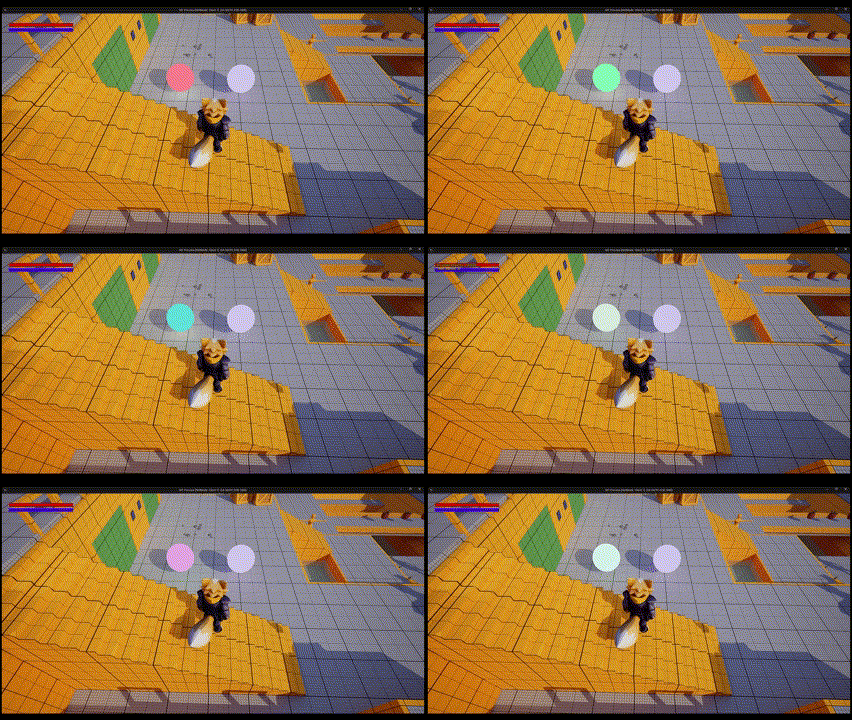
In the following example we set ReplicationPriority as 1.0 for the sphere on the left and 0.0 for the sphere on the right, as you can see the sphere on the right never replicates the color change.
Dynamic priority Link to heading
All replicated objects and actors with a world location implement dynamic prioritization called SphereNetObjectPrioritizer.
SphereNetObjectPrioritizier, it “draws” two spheres using the player position as reference and sets the priority for the actors based on the spheres. If the objects are inside “the first sphere” they will have the max priority, if they are outside the first sphere but inside the second sphere they will have a dynamic priority based on their position and if they are outside both spheres they will have the lowest priority.
Aside from SphereNetObjectPrioritizer you can set the dynamic priority using the prioritizers SphereWithOwnerBoostNetObjectPrioritizer, NetObjectCountLimiter or setting your own custom dynamic prioritizer.
To change the dynamic prioritizer you have to obtain the replication system, replication bridge and replicated ref handle as we did for the static priority. Then you have to obtain Prioritizer Handle using the name of one of the prioritizers we mentioned before and use it to set the new prioritizer for the actor.
Notice that you have to write in the prioritizer’s FName DefaultPrioritizer for SphereNetObjectPrioritizer, the prioritizers’ names can be found in your BaseEngine.ini, scroll down until you find the [/Script/IrisCore.NetObjectPrioritizerDefinitions] section.

//Includes necessary
#include "Net/Iris/ReplicationSystem/ReplicationSystemUtil.h"
#include "Iris/ReplicationSystem/ReplicationSystem.h"
#include "Net/Iris/ReplicationSystem/EngineReplicationBridge.h"
#include "Iris/ReplicationSystem/ObjectReplicationBridge.h"
#include "Iris/ReplicationSystem/Prioritization/NetObjectPrioritizer.h"
#if UE_WITH_IRIS
	UReplicationSystem* ReplicationSystem = UE::Net::FReplicationSystemUtil::GetReplicationSystem(RepActorPtr);
	UEngineReplicationBridge* ReplicationBridge = UE::Net::FReplicationSystemUtil::GetActorReplicationBridge(RepActorPtr);
	UE::Net::FNetRefHandle RepActorNetRefHandle = ReplicationBridge->GetReplicatedRefHandle(RepActorPtr);
	if (RepActorNetRefHandle.IsCompleteHandle())
	{
		FNetObjectPrioritizerHandle PrioritizerHandle = ReplicationSystem->GetPrioritizerHandle(FName("DefaultPrioritizer")); // Getting the Prioritizer
		if (!ReplicationSystem->SetPrioritizer(RepActorNetRefHandle, PrioritizerHandle))
			ReplicationSystem->SetStaticPriority(RepActorNetRefHandle, 1.0f);
	}
#endif
In case setting the new prioritizer fails, you can set the static priority like you did before to avoid issues.
Finally, you just have to set your prioritizer config in DefaultEngine.ini. In the following example you’ll see how you can set it for SphereNetObjectPrioritizerConfig (you can change the values as you needed).
[/Script/IrisCore.SphereNetObjectPrioritizerConfig]
InnerRadius=1000.0
OuterRadius=5000.0
InnerPriority=1.0
OuterPriority=0.0
OutsidePriority=0.0
Once your dynamic prioritizer is set you will notice your objects and actors affected by it won’t replicate once your character is far enough. In the following gif you can see how the sphere stops changing its color once the character out of the spheres range because its priority became 0.0.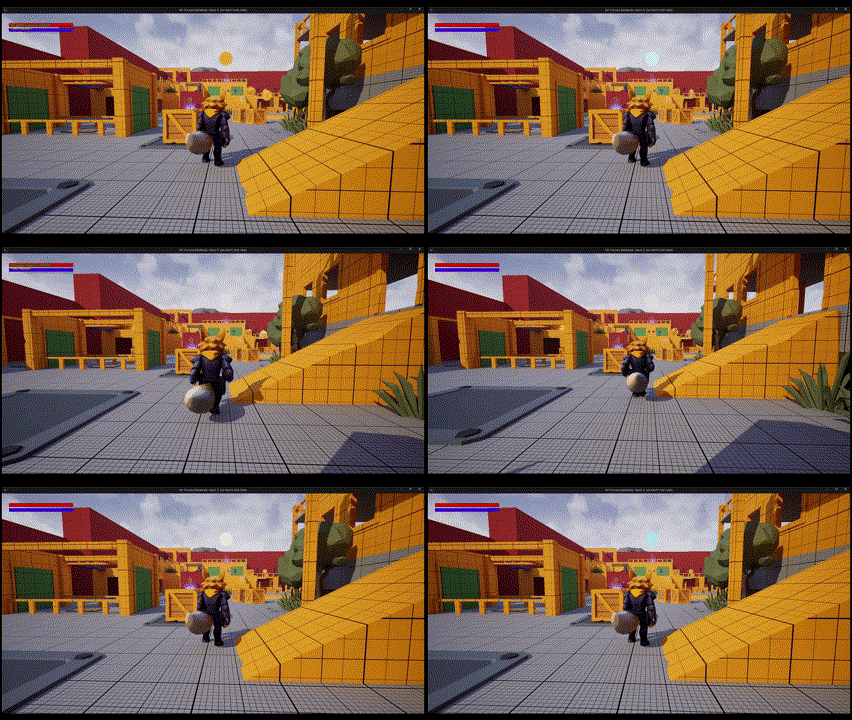
Custom Dynamic Prioritization Link to heading
In case you want to have even more control over the replication optimization or create different versions of one of the existing classes to apply it to certain actors or objects you can create your own prioritizater classes based on your needs.
To make it possible you have to first create a class which inherits from NetObjectPrioritizer or one of its subclasses and a class inherited from NetObjectPrioritizerConfig. For this example we created classes inherited from SphereNetObjectPrioritizer and SphereNetObjectPrioritizerConfig.
Once your classes are created you can register them in your DefaultEngine.ini setting the name of your Prioritizer and the path of your Prioritizer and its config class.
[/Script/IrisCore.NetObjectPrioritizerDefinitions]
+NetObjectPrioritizerDefinitions=(PrioritizerName=CustomPrioritizer, ClassName=/Script/MT.MTCustomPrioritizer, ConfigClassName=/Script/MT.MTCustomPrioritizerConfig)
For the example we set the values to stop replicating with less distance between the sphere with the custom prioritizer and the sphere with the default prioritizer.
[/Script/MT.MTCustomPrioritizerConfig]
InnerRadius=1000.0
OuterRadius=2000.0
InnerPriority=1.0
OuterPriority=0.0
OutsidePriority=0.0

[/Script/IrisCore.SphereNetObjectPrioritizerConfig]
InnerRadius=1000.0
OuterRadius=5000.0
InnerPriority=1.0
OuterPriority=0.0
OutsidePriority=0.0
As you can see in the following gif, the sphere with the custom prioritizer stops replicating even if the other sphere is still replicating because their prioritizers have different values for InnerRadius.
Considerations Link to heading
- To use FNetObjectPrioritizerHandle you must use #include “Iris/ReplicationSystem/Prioritization/NetObjectPrioritizer.h” even if it’s not in Epic’s tutorial.
- Epic’s documentation uses the following as an example to set a dynamic prioritizer [Script/Iris.SphereNetObjectPrioritizerConfig], as of now you have to add / before Script and IrisCore instead of Iris ([/Script/IrisCore.SphereNetObjectPrioritizerConfig]).
- The names of the prioritizers in the documentation don’t match with what you have to write when you want to get a prioritizer, you can find the names in your BaseEngine.ini in the part called [/Script/IrisCore.NetObjectPrioritizerDefinitions].
- Don’t try to access Iris components in the constructor, it could cause crashes.
- Epic’s documentation says you should use #include “Net/Iris/ReplicationSystem/ActorReplicationBridge.h” to some Iris functionalities but it will cause errors, you can use #include “Net/Iris/ReplicationSystem/EngineReplicationBridge.h” instead.
- In case you were following Epic’s tutorial you might notice Iris is not working, you can verify adding net.Iris.PushModelMode=2 to your DefaultEngine.ini and adding “IrisCore” to your modules. The documentation doesn’t mention it but we had to add them to make it work.
References Link to heading
- Iris Prioritization in Unreal Engine | Unreal Engine 5.5 Documentation | Epic Developer Community. (2025). Epic Games Developer. https://dev.epicgames.com/documentation/en-us/unreal-engine/iris-prioritization-in-unreal-engine#configureacustomdynamicprioritizer