Filtering Link to heading
Iris implements a filtering mechanism that allows you to choose which network connections will handle the replication of actors and objects. This feature can be especially useful for saving bandwidth and reducing replication overhead. You can filter using:
- Owner: Objects and actors only replicate in the same connections as its owner.
- Connection: Objects and actor replicate or avoid the specified connections, if you want to set a filter for many objects is better to implement a group.
- Group: Objects and actors replicate in the connections where the members of the same group replicate.
- Dynamic: Objects and actors can change dynamically between filters.
Owner filter Link to heading
For the following example let’s set the filter for the character to owner. To start working with Iris Filtering System you must include the following header files:
#include "Iris/ReplicationSystem/ReplicationSystem.h"
#include "Iris/ReplicationSystem/Filtering/NetObjectFilter.h"
#include "Net/Iris/ReplicationSystem/EngineReplicationBridge.h"
#include "Net/Iris/ReplicationSystem/ReplicationSystemUtil.h"
Then you have to obtain on BeginPlay the replication system, replication bridge and replicated ref handle of your actor for later setting the filter.
#if UE_WITH_IRIS
	if (AActor* RepActorPtr = this)
	{
		UReplicationSystem* ReplicationSystem = UE::Net::FReplicationSystemUtil::GetReplicationSystem(RepActorPtr);
		UEngineReplicationBridge* ReplicationBridge = UE::Net::FReplicationSystemUtil::GetActorReplicationBridge(RepActorPtr);
		UE::Net::FNetRefHandle RepActorNetRefHandle = ReplicationBridge->GetReplicatedRefHandle(RepActorPtr);
		if (RepActorNetRefHandle.IsCompleteHandle())
			ReplicationSystem->SetFilter(RepActorNetRefHandle, UE::Net::ToOwnerFilterHandle);
	}
#endif
As you can see in the following image, both clients are visible for the server but in the clients’ windows only the controller character is visible. This is because all the characters exist in the server but they are set to be replicated only for owner’s connections.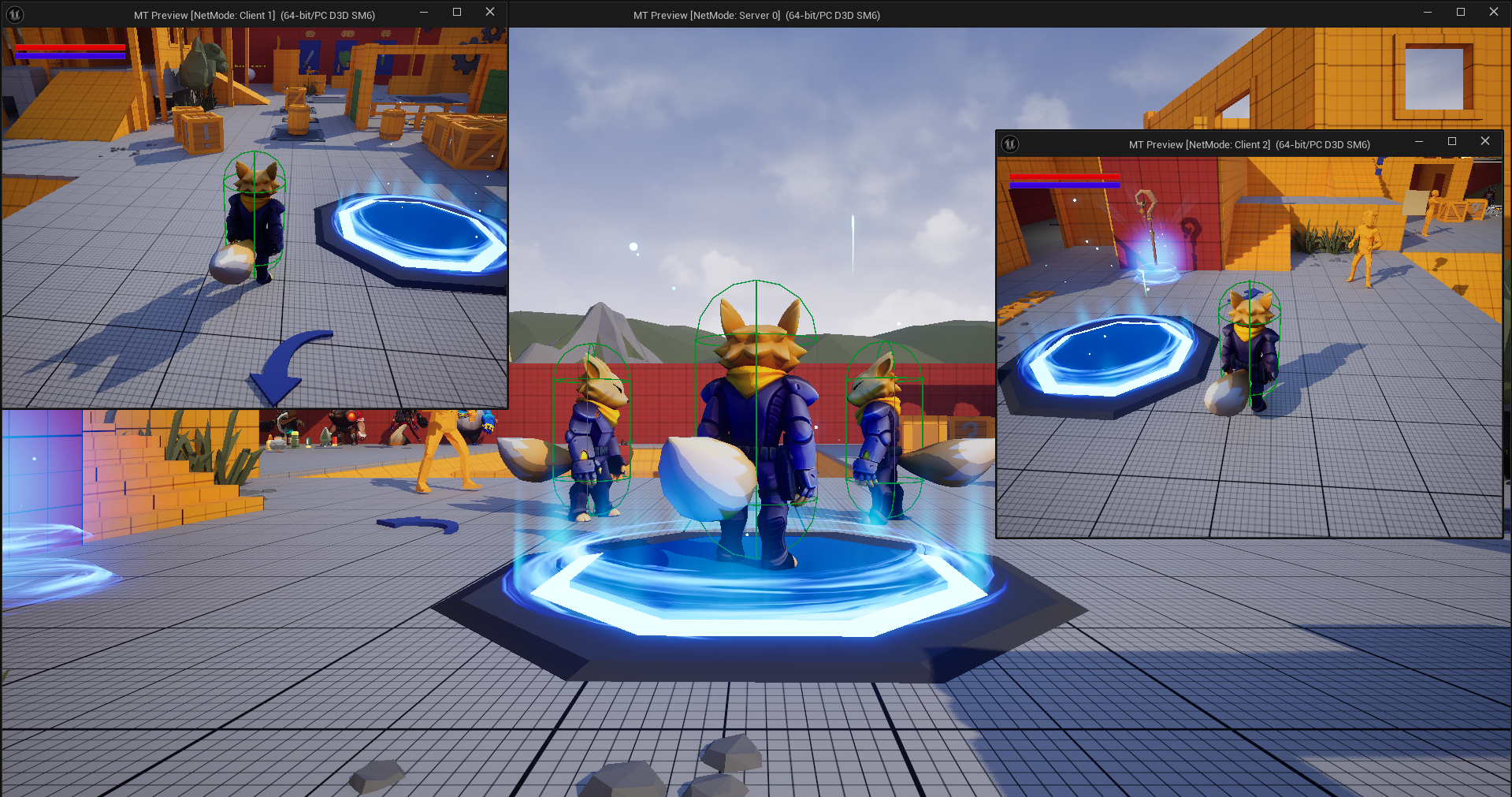 It’s important to emphasize that actors spawned by abilities won’t be directly set with the filter, so in cases like Fireball Ability the projectile will be visible and cause damage to other actors.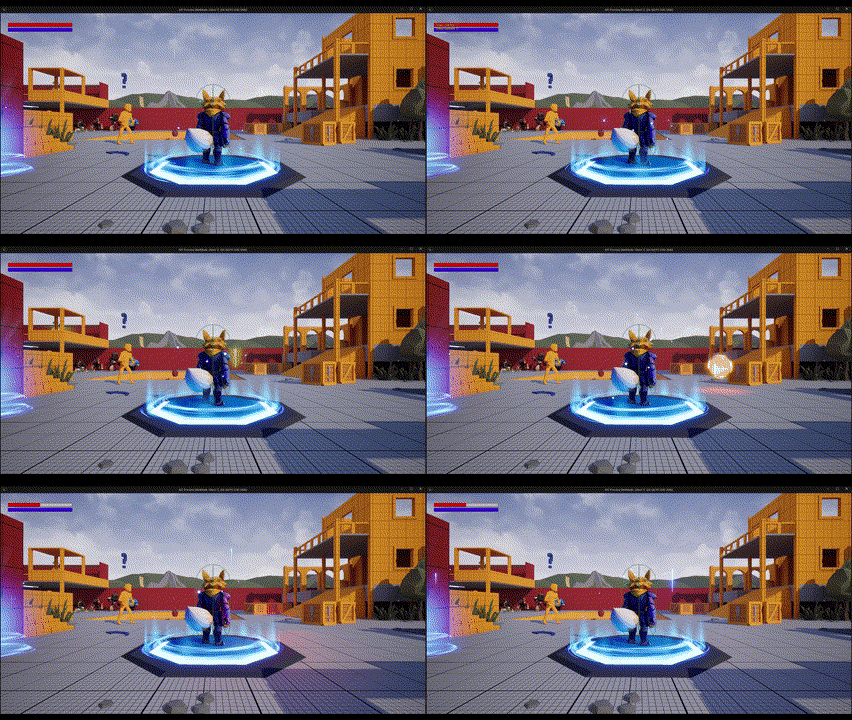
Clearing filter Link to heading
To clear the existing filters for actors and objects you just have to invalidate the filter handler similiar way you set it before. Using the replication system you can set a new filter with UE::Net::InvalidNetObjectFilterHandle to make all the previous filters invalid.
#if UE_WITH_IRIS
	if (AActor* RepActorPtr = this)
	{
		UReplicationSystem* ReplicationSystem = UE::Net::FReplicationSystemUtil::GetReplicationSystem(RepActorPtr);
		UEngineReplicationBridge* ReplicationBridge = UE::Net::FReplicationSystemUtil::GetActorReplicationBridge(RepActorPtr);
		UE::Net::FNetRefHandle RepActorNetRefHandle = ReplicationBridge->GetReplicatedRefHandle(RepActorPtr);
		if (RepActorNetRefHandle.IsCompleteHandle())
			ReplicationSystem->SetFilter(RepActorNetRefHandle, UE::Net::InvalidNetObjectFilterHandle);
	}
#endif
Connection filtering Link to heading
To set a filter based on connection you need to create a TBitArray where you’ll set a boolean value for every position of the array, the position will represent the connection id of the objects affected by the connection. At first every connection will be false and you have to add the value true for the connection id of the affected actor (you have to verify the position on the array or it could crash).
Once your TBitArray is ready you just have to set the connection filter passing your replicated ref handle, the bit array and the filter status for your connections.
#if UE_WITH_IRIS
	if (AActor* RepActorPtr = this)
	{
		UReplicationSystem* ReplicationSystem = UE::Net::FReplicationSystemUtil::GetReplicationSystem(RepActorPtr);
		UEngineReplicationBridge* ReplicationBridge = UE::Net::FReplicationSystemUtil::GetActorReplicationBridge(RepActorPtr);
		UE::Net::FNetRefHandle RepActorNetRefHandle = ReplicationBridge->GetReplicatedRefHandle(RepActorPtr);

		if(HasAuthority())
		{
			if (RepActorNetRefHandle.IsCompleteHandle())
			{
				int32 MaxConnections = 100;

				TBitArray<> Connections;
				Connections.Init(false, MaxConnections);

				if(GetNetConnection())
				{
					uint32 ConnectionId = GetNetConnection()->GetConnectionHandle().GetParentConnectionId();
					if(Connections.IsValidIndex(ConnectionId))
						Connections.Insert(true, ConnectionId);
				}

				ReplicationSystem->SetConnectionFilter(RepActorNetRefHandle, Connections, UE::Net::ENetFilterStatus::Disallow);
			}
		}
	}
#endif
For the example we set a timer to change the connection after five seconds. As you can see in the following gif, once the timer ends the character stops being replicated.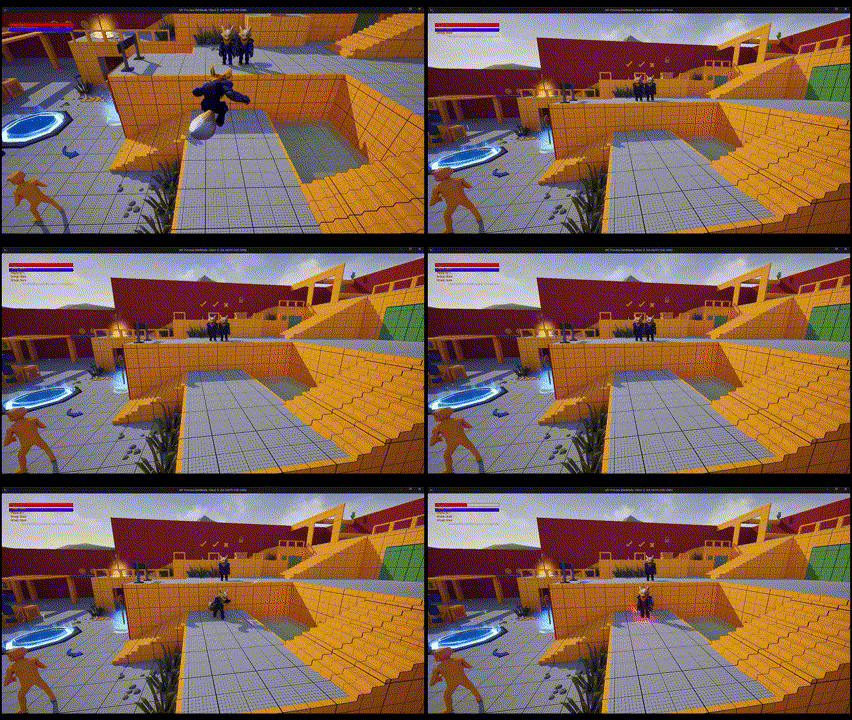
As the client stops its replication during the animation it gets “stucked” for the listen server and will disappear for the other clients.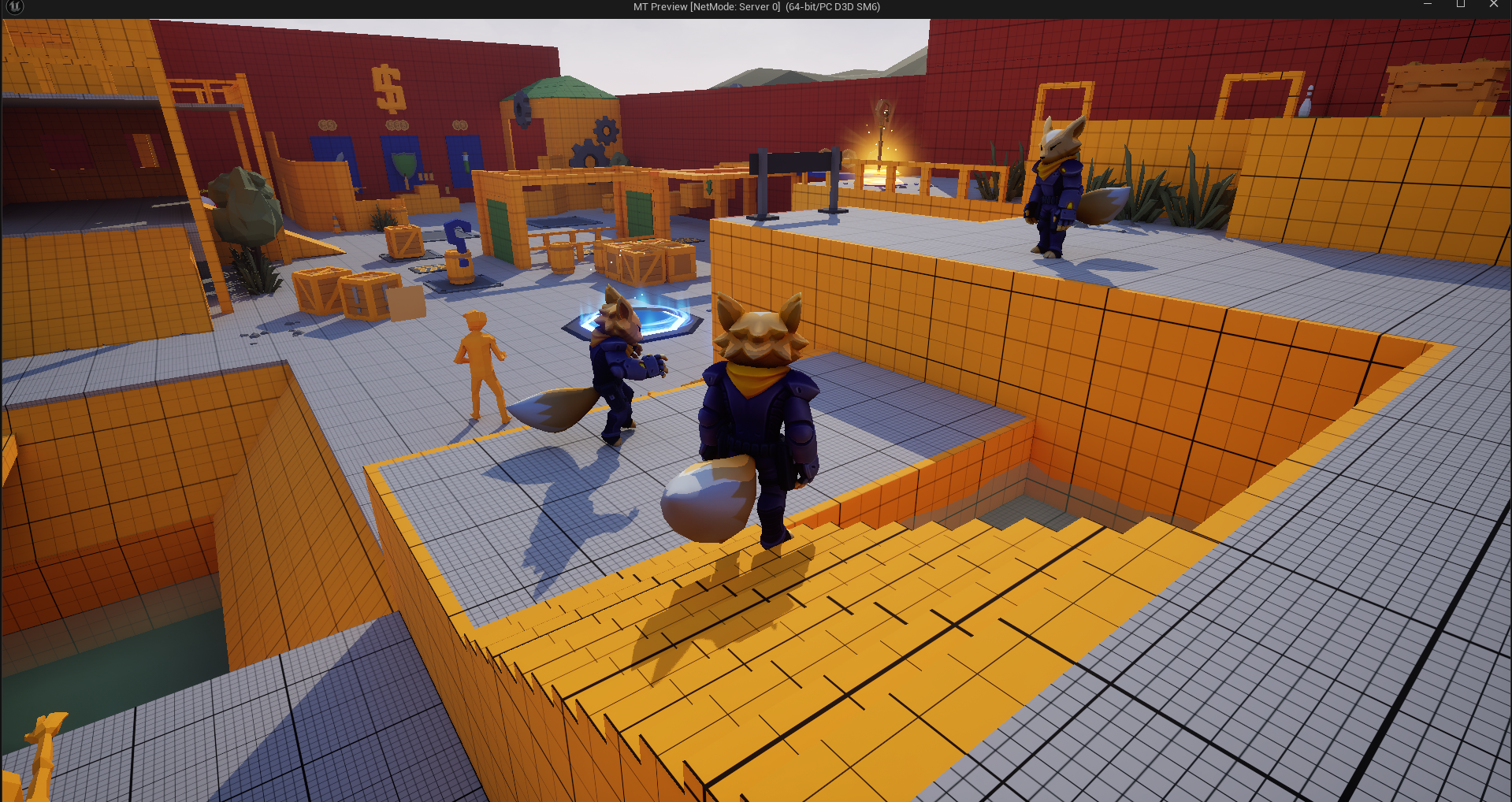
Clearing connections filter Link to heading
To clear the connection filter for an actor you just to set the connection filter with an empty TBitArray.
#if UE_WITH_IRIS
if (AActor* RepActorPtr = this)
{
	UReplicationSystem* ReplicationSystem = UE::Net::FReplicationSystemUtil::GetReplicationSystem(RepActorPtr);
	UEngineReplicationBridge* ReplicationBridge = UE::Net::FReplicationSystemUtil::GetActorReplicationBridge(RepActorPtr);
	UE::Net::FNetRefHandle RepActorNetRefHandle = ReplicationBridge->GetReplicatedRefHandle(RepActorPtr);

	TBitArray<> NoConnections;

	ReplicationSystem->SetConnectionFilter(RepActorNetRefHandle, NoConnections, UE::Net::ENetFilterStatus::Disallow);
}
#endif
Group filtering Link to heading
To filter using groups, first you should check if your group already exists. If the group doesn’t exist you can create the group and add the exclusion/inclusion filter to your replication system.
Once your group has been created you can set the group filter status using the group handle, an id number for the group and the filter status to finally add your replicated ref handle to the group.
#if UE_WITH_IRIS
	if (AActor* RepActorPtr = this)
	{
		UReplicationSystem* ReplicationSystem = UE::Net::FReplicationSystemUtil::GetReplicationSystem(RepActorPtr);
		UEngineReplicationBridge* ReplicationBridge = UE::Net::FReplicationSystemUtil::GetActorReplicationBridge(RepActorPtr);
		UE::Net::FNetRefHandle RepActorNetRefHandle = ReplicationBridge->GetReplicatedRefHandle(RepActorPtr);

		if(HasAuthority())
		{
			if (RepActorNetRefHandle.IsCompleteHandle())
			{
				UE::Net::FNetObjectGroupHandle GroupHandle = ReplicationSystem->FindGroup(FName("TestGroup"));

				if(!GroupHandle.IsValid())
				{
					GroupHandle = ReplicationSystem->CreateGroup(FName("TestGroup"));
					ReplicationSystem->AddExclusionFilterGroup(GroupHandle);
				}

				if(GroupHandle.IsValid())
				{
					ReplicationSystem->SetGroupFilterStatus(GroupHandle, 0, UE::Net::ENetFilterStatus::Disallow);
					ReplicationSystem->AddToGroup(GroupHandle, RepActorNetRefHandle);
				}

			}
		}
	}
#endif
If everything worked as expected you should be able to see the same results that we showed in the last gif and image.
Removing from group Link to heading
To remove an actor from a group you just have to follow the same steps to add it but instead of calling ReplicationSystem->AddToGroup(GroupHandle, RepActorNetRefHandle) you have to use ReplicationSystem->RemoveFromGroup(GroupHandle, RepActorNetRefHandle).
ReplicationSystem->RemoveFromGroup(GroupHandle, RepActorNetRefHandle);
Considerations Link to heading
- To set connection filtering, Unreal’s documentation says you have to use GetNetConnection()->GetConnectionID() to obtain the ID, but the function is deprecated. Insted of it you can use GetNetConnection()->GetConnectionHandle().GetParentConnectionId();.
- To create a group, Unreal’s documentation says you have to use UE::Net::FNetObjectGroupHandle GroupHandle = ReplicationSystem->CreateGroup(); to create a group, currently you can use that function but you have to pass an FName with the name of the group as parameter. Addiotionally ReplicationSystem->AddGroupFilter(GroupHandle); is no longer working, you have to use ReplicationSystem->AddExclusionFilterGroup(GroupHandle); or ReplicationSystem->AddInclusionFilterGroup(GroupHandle); depending on what you want to do.
- Don’t try to access Iris components in the constructor, it could cause crashes.
- Epic’s documentation says you should use #include “Net/Iris/ReplicationSystem/ActorReplicationBridge.h” to some Iris functionalities but it will cause errors, you can use #include “Net/Iris/ReplicationSystem/EngineReplicationBridge.h” instead.
- In case you were following Epic’s tutorial you might notice Iris is not working, you can verify adding net.Iris.PushModelMode=2 to your DefaultEngine.ini and adding “IrisCore” to your modules. The documentation doesn’t mention it but we had to add them to make it work.
References Link to heading
- Iris Filtering in Unreal Engine | Unreal Engine 5.5 Documentation | Epic Developer Community. (2025). Epic Games Developer. https://dev.epicgames.com/documentation/en-us/unreal-engine/iris-filtering-in-unreal-engine