Setting up GAS Link to heading
To start working with Gameplay Ability System (GAS) it is necessary to enable the plugin called “Gameplay Abilities” in the Plugins section of your project.

After enabling the plugin and restarting the engine it’s necessary to add some modules in your Build.cs file. The modules are “GameplayAbilities”, “GameplayTags” and “GameplayTasks”.
PublicDependencyModuleNames.AddRange(new string[] { "Core", "CoreUObject", "Engine", "InputCore", "EnhancedInput", "GameplayAbilities", "GameplayTags", "GameplayTasks" });
Adding Ability System Interface to classes Link to heading
The Gameplay Ability System requires classes that implement it to include the IAbilitySystemInterface and they must have the GetAbilitySystemComponent() function overridden.
#include "AbilitySystemInterface.h"

class UAttributeSet;
class UAbilitySystemComponent;


UCLASS()
class MT_API AMTPlayerState : public APlayerState, public IAbilitySystemInterface
{
	GENERATED_BODY()

	AMTPlayerState();

public:

	virtual UAbilitySystemComponent* GetAbilitySystemComponent() const override;
UAbilitySystemComponent* AMTPlayerState::GetAbilitySystemComponent() const
{
	return AbilitySystemComponent;
}
Create the Ability System Component Link to heading
To create an Ability System Component (ASC) class use AbilitySystemComponent as parent class.
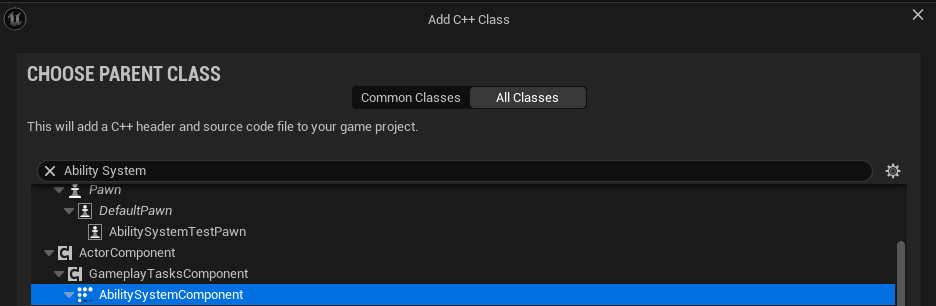
After that, create a reference to our Ability System Component in the header file of our player state class.
UPROPERTY()
TObjectPtr<UAbilitySystemComponent> AbilitySystemComponent;
As with other components in Unreal Engine, we have to create an Ability System Component for our class using CreateDefaultSubobject in the constructor.
AbilitySystemComponent = CreateDefaultSubobject<UMTAbilitySystemComponent>("Ability System Component");
When working on a multiplayer game, it is necessary to set the replication for our Ability System Component to true and configure its replication mode. This ensures that abilities and their effects are properly synchronized across the server and clients.
AbilitySystemComponent->SetIsReplicated(true);
AbilitySystemComponent->SetReplicationMode(EGameplayEffectReplicationMode::Mixed);
Initialize actor info Link to heading
After creating the Ability System Component we must initialize the Avatar and Owner when the character is possessed to set its information in server.
//Character header file
virtual void PossessedBy(AController* NewController) override;
//Function declaration
void AMTCharacter::PossessedBy(AController* NewController)
{
	Super::PossessedBy(NewController);

	if(AMTPlayerState* MTPlayerState = Cast<AMTPlayerState>(GetPlayerState()))
	{
		if(MTPlayerState->AbilitySystemComponent)
			MTPlayerState->AbilitySystemComponent->InitAbilityActorInfo(MTPlayerState, this);
	}
}
For multiplayer games we must do the same in the function called OnRep_PlayerState to set the information for the client too.
//Character header file
virtual void OnRep_PlayerState() override;
void AMTCharacter::OnRep_PlayerState()
{
	Super::OnRep_PlayerState();

	if(AMTPlayerState* MTPlayerState = Cast<AMTPlayerState>(GetPlayerState()))
	{
		if(MTPlayerState->AbilitySystemComponent)
			MTPlayerState->AbilitySystemComponent->InitAbilityActorInfo(MTPlayerState, this);
	}
}
References Link to heading
- Tranek. (s. f.). GitHub - tranek/GASDocumentation: My understanding of Unreal Engine 5’s GameplayAbilitySystem plugin with a simple multiplayer sample project. GitHub. https://github.com/tranek/GASDocumentation?tab=readme-ov-file#intro
- Gameplay Ability System for Unreal Engine | Unreal Engine 5.5 Documentation | Epic Developer Community. (2025). Epic Games Developer. https://dev.epicgames.com/documentation/en-us/unreal-engine/gameplay-ability-system-for-unreal-engine
- Gameplay Ability System Component And Gameplay Attributes in Unreal Engine | Unreal Engine 5.5 Documentation | Epic Developer Community. (2025). Epic Games Developer. https://dev.epicgames.com/documentation/en-us/unreal-engine/gameplay-ability-system-component-and-gameplay-attributes-in-unreal-engine